Imagus left the Chrome Web Store on 31 August 2026, and Edge Add-ons lists only a copy from another publisher. On Chrome, four hover-zoom extensions take its place: Hover Zoom+, PhotoShow, Imagus Reborn and Bellevue, with Image Max URL available as a userscript. On Firefox the original Imagus is still listed. Of the five, Hover Zoom+ and Imagus Reborn do the most in the popup: both play videos and page through galleries, and Imagus Reborn needs one extra Chrome setting to run at all. The rest of the difference is whether the popup opens on hover or on a key, and which copy it shows: the original, a larger preview, or nothing.
Bellevue is this site’s own extension. It was tested the same way as the other four.
Every result below was checked on 7 and 8 October 2026 in Chromium, the open-source browser Chrome is built on, in a 1400 × 900 window, with one hover-zoom extension at a time on its default settings, and an ad blocker in every run so the pages loaded the same way.
What happened to Imagus
Imagus was removed from the Chrome Web Store on 31 August 2026. It was built on Manifest V2, the older extension format, and that was the day Chrome removed every remaining Manifest V2 extension from the store. Chrome itself stopped running them in version 139. Imagus’s last update on Chrome was version 0.9.9.1, in October 2024, and its address in the store now opens an empty page.
On Firefox, Imagus is still listed, at version 0.9.8.74. Firefox still supports Manifest V2 extensions, so it can still be installed there, but it hasn’t been updated since April 2020.
The original Hover Zoom is gone from the Chrome Web Store too. Hover Zoom+ continues it as an open-source project, and Imagus Reborn carries Imagus’s site rules over to the format Chrome runs now.
Where each one is listed
| Extension | Chrome | Edge | Firefox |
|---|---|---|---|
| Hover Zoom+ | yes | yes | yes |
| PhotoShow | yes | yes | yes |
| Imagus Reborn | yes, with one setting | not listed | yes |
| Image Max URL | userscript | userscript | yes |
| Imagus | removed | a copy from another publisher | yes, unchanged since 2020 |
| Bellevue | yes | yes | yes |
Store listings as of 7 October 2026. Only the Chrome builds were tested. Edge can also install extensions from the Chrome Web Store, which brings the Chrome-only ones to it, but that route wasn’t tested either.
Full size, video and galleries, tested side by side
Each extension was tried on the same nine thumbnails:
- the first three posts of the week on r/LandscapePhotography;
- the first three pins of a Pinterest search for mountain landscape;
- the first three results of a Google Images search for lighthouse, whose preview panel loads the full-size file from the site it came from.
Reddit and Pinterest were signed in. A video post and a two-photo gallery on old Reddit tested video and galleries. Smaller hover-zoom extensions, such as Imagus Mod and Ultra Zoom, weren’t tested.
| Extension | Opens on | Largest copy | Video | Gallery | Setup on Chrome |
|---|---|---|---|---|---|
| Hover Zoom+ | hover | 7 of 9 | plays | pages | none |
| PhotoShow | hover | 5 of 9 | still frame | no popup | none |
| Imagus Reborn | hover | 8 of 9 | plays | pages | Allow User Scripts |
| Image Max URL | Shift+Alt+I | 5 of 9 | no popup | no popup | a userscript manager and Allow User Scripts |
| Bellevue | Alt | 9 of 9 | thumbnail only | first image | a consent page |
“Largest copy” means the largest copy the site serves at its usual addresses: the i.redd.it file on Reddit, the originals folder on Pinterest (or 1200x where a pin has no original), and the file Google Images links to. The widths, in pixels, from the copy the page loads to the largest copy, with bold for that copy or a larger one:
| Thumbnail | Hover Zoom+ | PhotoShow | Imagus Reborn | Image Max URL | Bellevue |
|---|---|---|---|---|---|
| Reddit 1, 699 → 3024 | 3024 | 1080 | 3024 | — | 3024 |
| Reddit 2, 699 → 4000 | 4000 | 1080 | 4000 | — | 4000 |
| Reddit 3, 699 → 1280 | 1280 | 1080 | 1280 | — | 1280 |
| Pinterest 1, 236 → 1200 | 1200 | 1200 | 1200 | 1200 | 1200 |
| Pinterest 2, 236 → 1200 | — | 736 | — | — | 1200 |
| Pinterest 3, 235 → 1032 | — | 1032 | 1032 | 1032 | 1032 |
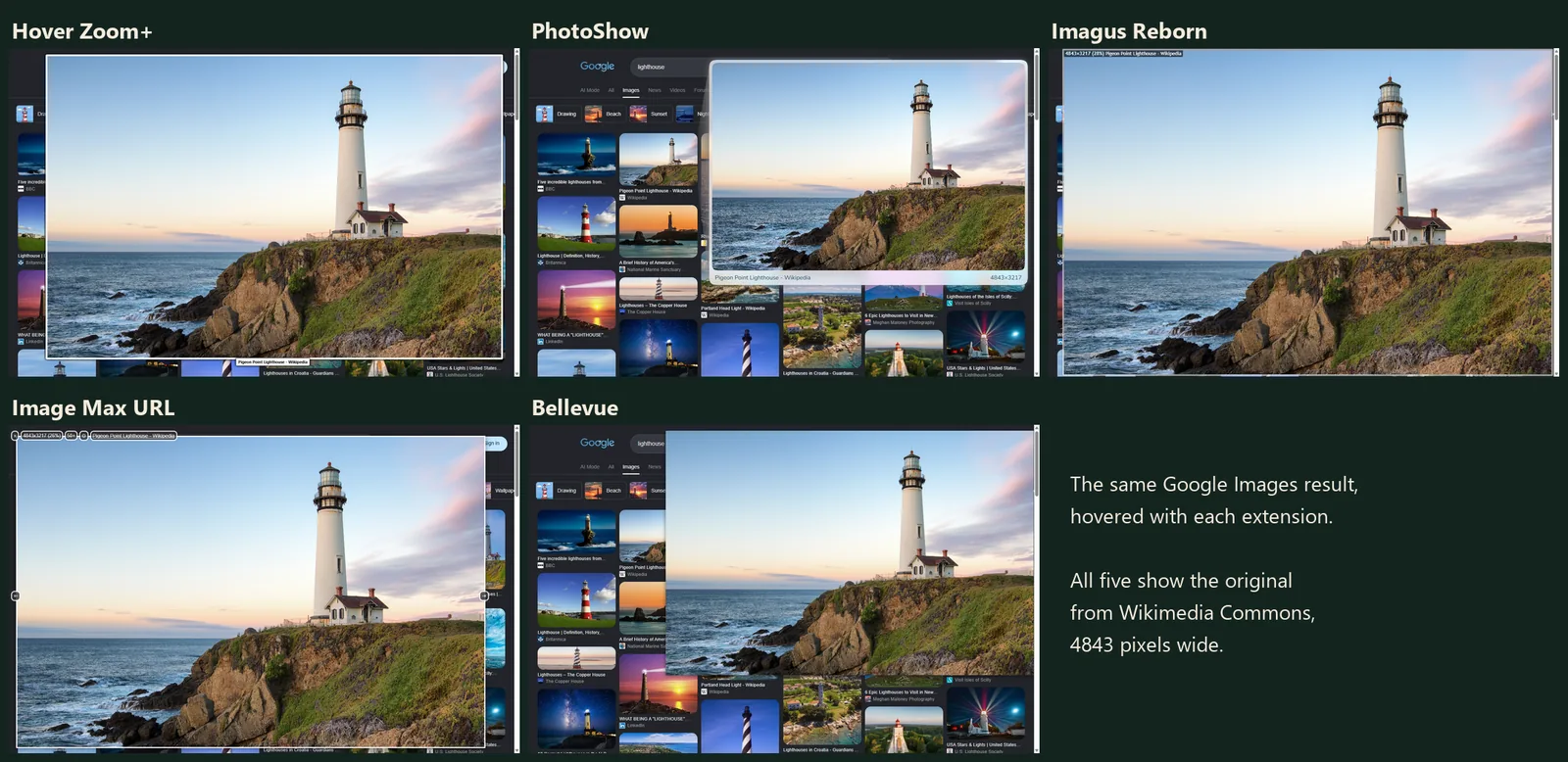
| Google 1, 738 → 1200 | 1200 | 1200 | 1200 | 2121 | 1200 |
| Google 2, 387 → 720 | 720 | 720 | 720 | 720 | 720 |
| Google 3, 549 → 4843 | 4843 | 4843 | 4843 | 4843 | 4843 |
A dash is a hover that showed no image. Each extension ran twice, and the table is the second run. In the first run on each of the two test days, Bellevue showed nothing for one Reddit photo; the other extensions’ first runs matched their second. The first run also released Image Max URL’s keys too early, so that run doesn’t count. Reddit’s top posts and Pinterest’s and Google’s results change between visits, so the same links can show other images.
What the table shows:
- Reddit: PhotoShow shows Reddit’s own 1080-pixel preview rather than the uploaded file, and its popup’s size label says so. Image Max URL showed nothing over the feed’s photos, though it does run on Reddit: over a subreddit’s banner, the same keys opened the banner, 1920 pixels wide.
- Pinterest: the second pin has no file in Pinterest’s
originalsfolder. PhotoShow fell back to the 736-pixel copy, Hover Zoom+ stayed on its loading spinner, and Imagus Reborn and Image Max URL showed nothing. Hover Zoom+ also showed nothing on the third pin, whose original is a PNG. - Google Images: all five found the source site’s file. On the first result, Image Max URL went further: it changed the size in the BBC’s own image address and showed a copy 2121 pixels wide, larger than the one Google links to.
Hover Zoom+
Hover Zoom+ is the open-source continuation of the original Hover Zoom. It shows the popup on plain hover after a tenth of a second, plays videos inline (a Reddit video played at 720 × 1280), and pages through galleries with the arrow keys or the mouse wheel. By default its keys rotate the image (R), switch to full zoom (Z) and lock the popup in place (L). It needed no setup in Chromium. Its site support is a set of plugins in the extension, and it showed the original on every Reddit and Google thumbnail but missed two of the three Pinterest pins.
PhotoShow
PhotoShow opens on plain hover and labels the popup with the image’s caption and its size, which makes it easy to see what you’re getting. Its README lists rotating, flipping, copying and downloading the image too. It ships rule files for more than 400 sites. It was the only one besides Bellevue to show something for all three Pinterest pins, falling back to a smaller copy where the original was missing. On Reddit it showed the 1080-pixel preview rather than the original, and over a video it showed a still frame. Its GitHub repository holds the source of an older version: the README says the code there “is no longer updated since migrating to Extension Manifest V3”, and that “PhotoShow is actively maintained and keeps evolving”.
Imagus Reborn
Imagus Reborn is the closest thing to Imagus on Chrome. It carries over Imagus’s site rules (823 of them in version 2026.9.27, updated from a repository), plays videos and pages through galleries in the popup, and showed the original on 8 of the 9 thumbnails.
It needs one setting first. On install it opens its options page with the message “To continue you have to allow User Scripts in the extension details”. In Chrome, open chrome://extensions, choose Details under Imagus Reborn, and switch on Allow User Scripts. Until then it does nothing.
Image Max URL
Image Max URL is built to find the largest version of an image, and the popup is one way to use it. It’s open source, under the Apache 2.0 license. On Firefox it’s an add-on. It isn’t in the Chrome Web Store or Edge Add-ons, so on those it runs as a userscript inside a userscript manager such as Violentmonkey, which on Chrome needs Allow User Scripts switched on as well.
By default the popup opens only while Shift+Alt+I is held over an image, and Esc closes it. It was the only one to find a copy larger than the source site’s own. It showed nothing for Reddit’s feed photos, the second Pinterest pin, the video or the gallery.
Bellevue
Bellevue shows the popup while Alt is held (Option on a Mac), and can be switched to plain hover in its settings. A tap of Ctrl opens the image full-screen, with the mouse wheel zooming in toward the cursor. On Reddit, X, Pixiv and Fandom it also replaces the site’s own image viewer. In the second run it showed the largest copy on all nine thumbnails, the second pin’s 1200x copy included; in the first run on each test day it showed nothing for one Reddit photo.
The popup shows images only: over a video it shows the thumbnail, and over a gallery the first image, with no paging. Its site rules are built into the extension and can’t be edited, and it isn’t open source. It opens a consent page on install, and does nothing until the user agrees. The guide to full-size images on hover covers its settings.
Which one to pick
- Closest to Imagus, on Chrome: Imagus Reborn, after switching on Allow User Scripts.
- Open source, no setup, listed on all three stores: Hover Zoom+.
- Videos and galleries in the popup: Hover Zoom+ or Imagus Reborn.
- A size label on every popup, and a fallback when the original is missing: PhotoShow.
- A copy larger than the one the site links to: Image Max URL, a userscript on Chrome (the Firefox add-on wasn’t tested).
- The original on a key, and a full-screen viewer: Bellevue.
- Imagus itself: only on Firefox, unchanged since 2020.
Hold Alt to see the original. Install Bellevue →