Firefox has no hover preview of its own, but it still has the hover-zoom add-ons Chrome lost. The original Imagus, unchanged since April 2020, still installs because Firefox kept the older extension format, and Image Max URL is a real add-on here rather than a userscript. Hover Zoom+, PhotoShow, Imagus Reborn and Bellevue are listed too. On the same nine thumbnails, Hover Zoom+, Imagus Reborn and Bellevue showed the original on eight or nine. The 2020 Imagus showed it on none, and Imagus Reborn needs one permission before it does anything.
Bellevue is this site’s own extension. It was tested the same way as the other five.
Every result below was checked on 14 October 2026 in Firefox 158 on Windows 11, in a 1400 × 900 window, with one add-on at a time installed from addons.mozilla.org on its default settings, and uBlock Origin in every run so the pages loaded the same way.
Hold Alt in Firefox to see the original. Add Bellevue to Firefox →
What Firefox does without an add-on
Nothing appears on hover. Open Image in New Tab opens the copy the page loaded, which on a Pinterest grid is 236 pixels wide. Once an image is in its own tab, Firefox fits it to the window and says so in the tab’s title: a 4843-pixel photo in a 1400-pixel window reads “Scaled (25%)”. Click the image to see it at full size, scrolled to where you clicked, and click again to fit it back. That’s all the image zoom Firefox has; Ctrl + + zooms the whole page.
The hover add-ons on Firefox
| Add-on | Last updated | Setup on Firefox | Firefox for Android |
|---|---|---|---|
| Hover Zoom+ | May 2026 | none | not listed |
| PhotoShow | October 2026 | none | not listed |
| Imagus Reborn | September 2026 | a permission, from its options page | not listed |
| Image Max URL | June 2026 | none | not listed |
| Imagus | April 2020 | none | listed |
| Bellevue | October 2026 | agreeing to share the pages you visit | listed |
Listings as of 14 October 2026. Imagus is still here because Firefox kept Manifest V2, the format Chrome stopped running. Mozilla says it is “keeping it alongside Manifest V3”. Thumbnail Zoom Plus, which older Firefox roundups still recommend, is no longer on addons.mozilla.org. Smaller add-ons such as Imagus mod and Ultra Zoom, and userscripts such as Mouseover Popup Image Viewer and Picviewer CE+, weren’t tested.
The comparison of hover zoom extensions tests the same add-ons in Chromium, the browser Chrome is built on.
Tested in Firefox
Each add-on was tried on the same nine thumbnails:
- the first three posts of the week on r/LandscapePhotography;
- the first three pins of a Pinterest search for mountain landscape;
- the first three results of a Google Images search for lighthouse.
Reddit and Pinterest were signed in. A video post and a gallery post on old Reddit tested video and galleries.
| Add-on | Opens on | Largest copy | Video | Gallery |
|---|---|---|---|---|
| Hover Zoom+ | hover | 8 of 9 | plays | pages |
| PhotoShow | hover | 5 of 9 | still frame | thumbnail only |
| Imagus Reborn | hover | 8 of 9 | plays | pages |
| Image Max URL | Shift+Alt+I | 7 of 9 | thumbnail only | first image |
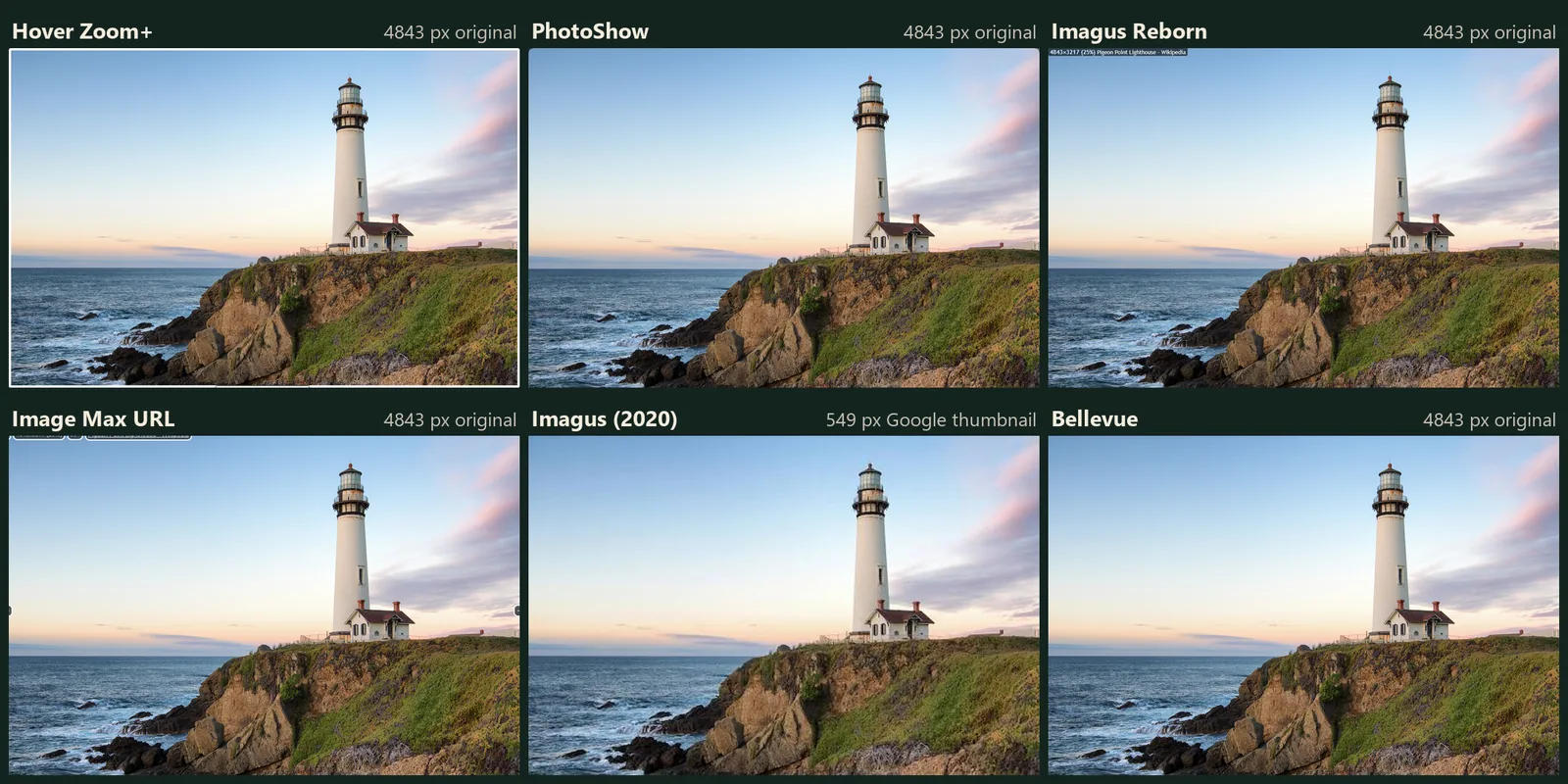
| Imagus (2020) | hover | 0 of 9 | plays | first image |
| Bellevue | Alt | 9 of 9 | thumbnail only | first image |
“Largest copy” means the largest copy the site serves at its usual addresses: the i.redd.it file on Reddit, the originals folder on Pinterest (or 1200x where a pin has no original), and the file Google Images links to. The pages load Reddit’s photos 692 pixels wide, Pinterest’s pins 236 wide, and Google’s three results 738, 549 and 695 wide. The width each popup showed, in pixels, with the largest copy in brackets and bold for that copy or a larger one:
| Thumbnail | Hover Zoom+ | PhotoShow | Imagus Reborn | Image Max URL | Imagus | Bellevue |
|---|---|---|---|---|---|---|
| Reddit 1 (1366) | 1366 | 1080 | 1366 | 1366 | 1080 | 1366 |
| Reddit 2 (3000) | 3000 | 1080 | 3000 | 3000 | 1080 | 3000 |
| Reddit 3 (3985) | 3985 | 1080 | 3985 | 3985 | 1080 | 3985 |
| Pin 1 (1200) | 1200 | 1200 | 1200 | 1200 | — | 1200 |
| Pin 2 (1200) | — | — | 736 | — | — | 1200 |
| Pin 3 (1032) | 1032 | 1032 | 1032 | 1032 | — | 1032 |
| Google 1 (1200) | 1200 | 1200 | 1200 | 2121 | 738 | 1200 |
| Google 2 (4843) | 4843 | 4843 | 4843 | 4843 | 549 | 4843 |
| Google 3 (1600) | 1600 | 1600 | 1600 | 695 | 695 | 1600 |
A dash is a hover that showed no image. Reddit’s top posts and Google’s results change between visits, so the same links can show other images; the three pins are the ones the Chromium comparison used.
What differs from the Chromium results:
- Image Max URL found the original on all three Reddit posts, where its userscript in Chromium showed nothing. It again found a copy of the BBC photo larger than the one Google links to. Its one miss on Google showed Google’s thumbnail; an earlier run found the file.
- Hover Zoom+ showed the third pin, a PNG, which it missed in Chromium. The second pin, which has no file in Pinterest’s
originalsfolder, still stayed on its loading spinner. - Imagus Reborn fell back to the 736-pixel copy of the second pin, where in Chromium it showed nothing. PhotoShow did the reverse: nothing for that pin in Firefox, the 736-pixel copy in Chromium.
- PhotoShow shows Reddit’s own 1080-pixel preview rather than the uploaded file, in both browsers, and its size label says so.
Imagus on Firefox: the 2020 original and Imagus Reborn
The original Imagus installs and runs: it played the Reddit video in its popup and showed the first photo of the gallery. On today’s sites it doesn’t find the original. On Reddit it showed Reddit’s 1080-pixel preview, on Pinterest it showed nothing, and on Google it enlarged Google’s own thumbnail rather than loading the file from the source site. Its site rules, which it calls sieves, are the 318 it shipped with in April 2020, and it has no source for newer ones set by default.
Imagus Reborn carries Imagus’s rules to the current format: 823 of them in version 2026.9.27, updated automatically from a repository. It showed the original on 8 of the 9 thumbnails, played the video and paged through the gallery with the arrow keys and the mouse wheel. It needs a permission first:
- Install it. Its options page opens with “To continue you have to allow User Scripts.”
- Click allow User Scripts. Firefox opens a prompt: “Imagus Reborn requests additional settings”.
- Tick Allow unverified third-party scripts to access your data, then click Allow.
Clicking Allow without ticking the box grants nothing, and until the permission is granted Imagus Reborn shows no popup at all. The permission uses an extension API that Firefox has on desktop only, which is why Imagus Reborn isn’t listed for Android.
Image Max URL as a Firefox add-on
On Chrome and Edge, Image Max URL runs only as a userscript. On Firefox it’s an add-on, open source under the Apache 2.0 license, and it opens a welcome page on install. Its listing describes two jobs: it redirects an image opened in a new tab to the largest version it finds, and it opens a popup. By default the popup appears only while Shift+Alt+I is held over an image, and Esc closes it. In the test it found the original on 7 of the 9 thumbnails, and it was the only add-on to find a copy larger than the source site’s own. Over a video it showed the thumbnail, and over a gallery the first image, with no paging.
Hover Zoom+, PhotoShow and Bellevue
Hover Zoom+ is open source under the MIT license and needs no setup. It opens on plain hover, played the Reddit video, and paged through the gallery with the arrow keys and the mouse wheel. It showed the original on 8 of the 9 thumbnails.
PhotoShow opens on plain hover and labels each popup with the image’s caption and size. It showed the largest copy on all three Google results and two of the three pins, and Reddit’s 1080-pixel preview on every post. Over a video it showed a still frame, and over a gallery a thumbnail.
Bellevue shows the popup while Alt is held. A tap of Ctrl opens the image full-screen with zoom and pan, and Shift opens the popup’s image in a background tab. Its settings are the same as on Chrome, and the guide to full-size images on hover covers them. It opens a consent page on install, and nothing runs until you agree. It showed the largest copy on all nine thumbnails in both test runs, the second pin’s 1200x copy included. The popup shows images only: over a video it shows the thumbnail, and over a gallery the first image, with no paging. Its site rules can’t be edited, and it isn’t open source.
Holding Alt in Firefox
On Windows, pressing and releasing Alt on its own makes Firefox show its menu bar with File selected, so the next key goes to the menu. Firefox does the same on Linux. An add-on that opens on a lone Alt has to stop that, or every look at an image ends in the menu bar.
Tested with real key presses on a Pinterest pin:
- No add-on: Alt opened the menu bar.
- Bellevue: holding Alt showed the original in the popup, and the menu bar stayed hidden when the key came up. While hover zoom is on, a lone Alt elsewhere on a page doesn’t open the menu bar either.
- Image Max URL: Shift+Alt+I showed the popup without the menu bar. A lone Alt still opens it, as it does without the add-on.
The other four open on plain hover, so Alt isn’t involved. On a Mac, Firefox’s menus are in the system menu bar, and Option doesn’t open them.
Where hover add-ons don’t run in Firefox
- Mozilla’s own sites. Firefox doesn’t let add-ons run on addons.mozilla.org, support.mozilla.org, the Firefox account pages and a few others. Hovering a screenshot on an add-on’s listing showed no popup with Bellevue or Hover Zoom+. Right after installing an add-on, the page you’re on is its listing, so try it on another site.
- Other restricted sites. Mozilla can restrict more sites. Each add-on’s page in
about:addonshas Run on sites with restrictions, set to Allow or Don’t Allow. Mozilla’s own sites above stay closed either way. - Private windows. The install prompt has Allow extension to run in private windows, unticked. Left that way, none of the six runs in a private window. To change it later, open the add-on’s page in
about:addonsand set Run in Private Windows to Allow. - Video. Over a Reddit video, Bellevue, Image Max URL and PhotoShow showed a still image. Hover Zoom+, Imagus Reborn and the 2020 Imagus played it.
Firefox for Android
Imagus and Bellevue are listed for Firefox for Android, which has opened up to add-ons since December 2023. The other four aren’t. A phone has no cursor to hover with, and neither add-on was tested on Android here.
Which one to pick on Firefox
- Closest to Imagus, kept up to date: Imagus Reborn, after allowing user scripts.
- Open source, no setup, videos and galleries: Hover Zoom+.
- A copy larger than the one the site links to: Image Max URL.
- A size label on every popup: PhotoShow.
- The original on a key, and a full-screen viewer: Bellevue.
- The 2020 Imagus: only if it already works on the sites you use. On Reddit, Pinterest and Google Images it didn’t find the original.
Hold Alt in Firefox to see the original. Add Bellevue to Firefox →