Chrome has no way to show an image’s EXIF data: the camera, the settings, the date and often the place that a camera or phone records in the file. Not in an image tab, and not in Inspect. To read it, save the image and open its properties in Windows or macOS, or paste its address into an online metadata viewer. Most images on web pages have none to show, though: thumbnails and the copies many sites serve are saved without it, and the original is where it survives, if anywhere. With the Bellevue extension, tap Ctrl over a thumbnail to open its original, then press I.
Every check below, except Reddit’s, was made on 25 October 2026: the files read with ExifReader, the same parser Bellevue uses, and Bellevue 2.1.0 in Chromium 149 on Windows 11, in a 1440 × 900 window.
Read the camera data in a photo’s original. Install Bellevue →
Read EXIF data without an extension
Save the file and open its properties
Right-click the image, choose Save image as, then:
- Windows 11: right-click the saved file, choose Properties and open the Details tab. It lists the camera maker and model, lens model, F-stop, exposure time, ISO speed, focal length and date taken, and the latitude and longitude when the photo has them.
- macOS: open the file in Preview. Tools › Show Inspector lists its EXIF data under More Info, and Tools › Show Location Info puts the GPS position on a map (Apple).
Windows 11’s Details tab doesn’t read EXIF from PNG files. Three copies of the same photo, each carrying the same camera data and GPS position, showed all of it there as a JPEG and a WebP, and none of it as a PNG.
Save the original, not the thumbnail on the page. Save image as on a Wikipedia article’s photo saves the thumbnail, which has no camera data. Click the photo, then More details, and save from the Original file link on the file’s page instead. On sites with a “view original” or download link, save from that.
Paste its address into an online viewer
Right-click the image, choose Copy image address, and paste it into ezgif’s metadata viewer, under Or enter direct image URL. Given the Golden Gate Bridge original’s address, it listed the camera, lens, exposure and GPS position without the file being saved first. Its server fetches the image, so this works only for images anyone can open, not for one behind a login. ezgif says it deletes files an hour after upload.
ExifTool reads every tag in a file from the command line, maker notes and copyright fields included.
Why most web images show no EXIF data
A camera or phone writes EXIF into the original file. Sites mostly show a resized copy, and resizing writes a new file, which has no EXIF unless the site copies it across. Wikipedia’s thumbnails leave it out; a request on Wikimedia’s tracker asks for at least some of it to be kept. Many sites serve their full-size files without it too. So “no EXIF data” usually means you’re not looking at the original, or that the file never reached the web with its EXIF, not that the tool failed.
Here is what was in the files themselves, on eight sites, in the largest version Bellevue opened from each thumbnail:
| Site | Files checked | With camera data |
|---|---|---|
| Wikipedia | 2 | 2, one with the location |
| 3 | 1, the camera model alone | |
| Flickr | 3 | none |
| Unsplash | 3 | none |
| 5 | none | |
| X | 3 | none |
| Imgur | 3 | none |
| Reddit (JPEGs) | 36 | none |
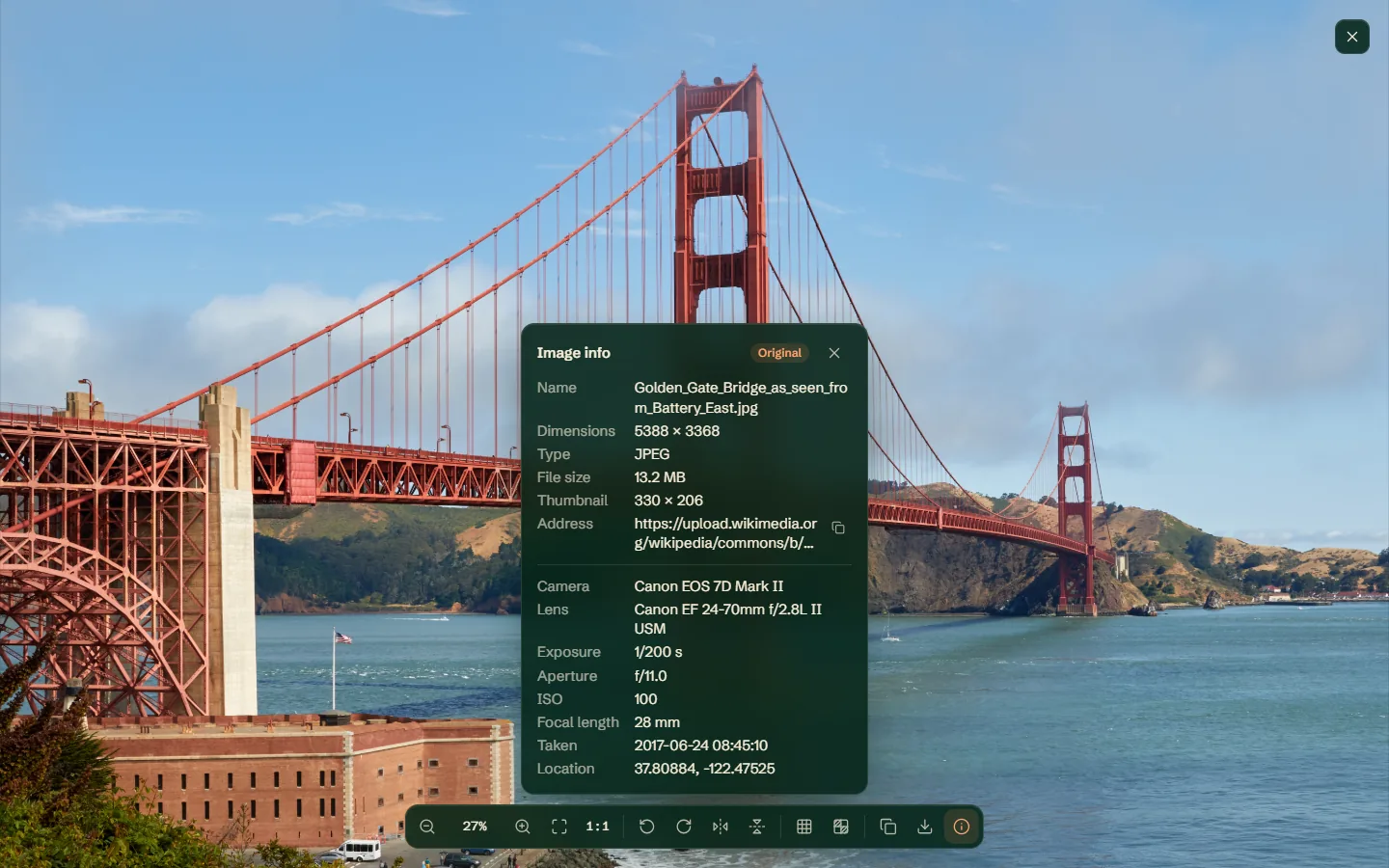
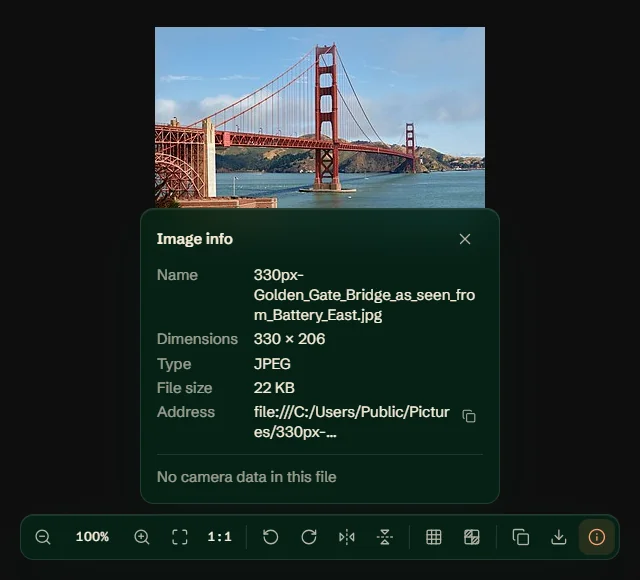
Flickr’s are 2048 pixels wide, and each photo’s page names a camera that the 2048-pixel copy doesn’t carry. Unsplash’s run up to 12,336 pixels wide and still carry none. Reddit’s 36 are the uploaded JPEGs behind public posts, checked on 12 October for the post on Reddit’s compression, which found Reddit re-saves a JPEG without its EXIF. The thumbnails checked on Wikipedia, Flickr, Unsplash and Pinterest carried no camera data at all. The same Golden Gate Bridge photo has a Canon EOS 7D Mark II, 1/200 s at f/11, and the spot it was taken from in its 13.2 MB original, and nothing in its 22 KB thumbnail.
One EXIF field does something in Chrome without being shown: the orientation tag, which says which way up a phone photo goes. A site that strips it without turning the pixels is why some photos show up sideways.
View EXIF data in Chrome with Bellevue
In Bellevue’s viewer, press I, or click Image info at the right end of the toolbar, which appears when the pointer nears the viewer’s bottom edge. The panel lists the file’s name, dimensions, type, size and address, then the camera, lens, exposure, aperture, ISO, focal length, date taken and location recorded in it. A file without camera data says No camera data in this file. I or Esc closes it, and the key can be changed in the settings.
Open the original first
Tap Ctrl over a thumbnail, or right-click it and choose View image in current tab, and Bellevue opens its full-size original in the viewer, on hundreds of sites. The info panel then marks the image Original and gives the thumbnail’s size, so you know you’re reading the largest file the site serves, where camera data survives if anywhere. On Wikipedia’s Golden Gate Bridge article, that turned the 330 × 206 thumbnail into the 5388 × 3368 original, and the panel listed its camera, lens, exposure and location, as in the recording below.
Opening a Wikipedia thumbnail’s own address in a tab lands on the original too, since Bellevue sends an image tab from a thumbnail to its full-size file. The panel works in the viewer Bellevue puts in Reddit’s lightbox as well, where I on a post’s i.redd.it original showed No camera data in this file. The hover popup has no panel; to read an image you’re hovering, tap Ctrl.
What the panel reads, and what it doesn’t
The panel read the same camera data and location from JPEG, PNG, WebP and AVIF copies of the bridge photo, including the PNG that Windows showed nothing for. It reads photos on your own computer too: open one in a tab and press I. Chrome needs Bellevue to be allowed to open local files, and Bellevue opens a short guide to turning that on the first time it’s needed.
The location is the GPS position as text, with no map; paste it into a map’s search box to see the spot. The panel doesn’t show copyright, caption or keyword fields, maker notes or a full list of tags; for those, use ezgif or ExifTool. The copy button beside the address puts the original’s address on the clipboard, ready to paste into ezgif.
On install, Bellevue opens a consent page and does nothing until it’s answered. For zoom, rotation and the rest of the toolbar, see the guide to Chrome’s image viewer. Bellevue is one of six image viewer extensions tested side by side.
Check your own photo for location data before sharing
A phone photo usually records where it was taken, and the file carries that wherever it’s sent, unless something strips it on the way. Before sharing the file itself, check it: Windows’ Details tab or Preview’s Show Location Info shows the position if there is one, and so does Bellevue’s panel for the file opened in a tab. On Windows, the Remove Properties and Personal Information link at the bottom of the Details tab offers to remove it.
Don’t rely on Windows for a PNG: its Details tab showed no location for a PNG that carried one, so it can’t be trusted to remove one either. That matters on Reddit, which re-saves an uploaded JPEG without its EXIF but keeps a PNG’s, GPS position included.
Summary
- Chrome can’t show EXIF data. Save the image and read it in Windows’ Details tab or Preview’s inspector, or paste its address into ezgif’s metadata viewer.
- The thumbnails checked carried no EXIF, and of eight sites checked, only Wikipedia’s originals carried full camera data. The original is the file to read.
- Windows’ Details tab shows nothing for a PNG’s EXIF, location included.
- Bellevue opens a thumbnail’s original with a Ctrl tap, marks it Original, and shows its camera, settings, date and location with I, in JPEG, PNG, WebP and AVIF files alike.
Read the camera data in a photo’s original. Install Bellevue →