Chrome’s image viewer switches between fitting the window and actual size, and that’s all it does. Of the extensions that do more with images in Chrome, BetterViewer and OpenImage Viewer do the most: each is a viewer with zoom toward the cursor, rotate and flip, and a photo editor built in. Bellevue is a viewer without the editor, and Oolong Image Viewer is the plainest. Image Zoom and Image Manipulator work only from the right-click menu. One difference doesn’t show in any feature list: given a thumbnail from the right-click menu, the other four with a menu item enlarge the thumbnail, and only Bellevue opens the original.
Bellevue is this site’s own extension. It was tested the same way as the other five.
Every result below was checked on 18 October 2026 in Chromium, the open-source browser Chrome is built on, in a 1400 × 900 window, with one extension at a time on its default settings. The versions tested were BetterViewer 3.2.0, OpenImage Viewer 2.0.3, Oolong Image Viewer 1.7.2, Image Zoom 0.0.3, Image Manipulator 1.2.10 and Bellevue 1.4.0, the last as its Edge build, which runs the same code as its Chrome build on these pages.
Open the original, not the thumbnail. Install Bellevue →
What Chrome’s own viewer can’t do
Open an image in its own tab and Chrome fits it to the window. A click switches to actual size with scrollbars, and another click fits it back. Page zoom, Ctrl + +, steps between 25% and 500% but not toward the cursor, and nothing rotates or flips the image. An SVG file gets even less: Chrome draws it like a web page, often pinned to the top-left corner. The guide to Chrome’s image viewer covers what page zoom and a touchpad pinch can do by hand. The rest takes an extension.
Two kinds of image viewer extension
- Image tab viewers take over when an image opens in its own tab, for example from Open image in new tab. BetterViewer, OpenImage Viewer, Oolong Image Viewer and Bellevue do this.
- Right-click viewers add an item to the image menu that opens the image over the page, or in a tab of their own. BetterViewer, OpenImage Viewer, Image Zoom and Bellevue do this. Image Manipulator’s menu changes the image where it sits on the page instead.
A third kind, hover zoom, shows an enlarged copy in a popup while the mouse is over a thumbnail. Those extensions have their own comparison.
Tested side by side
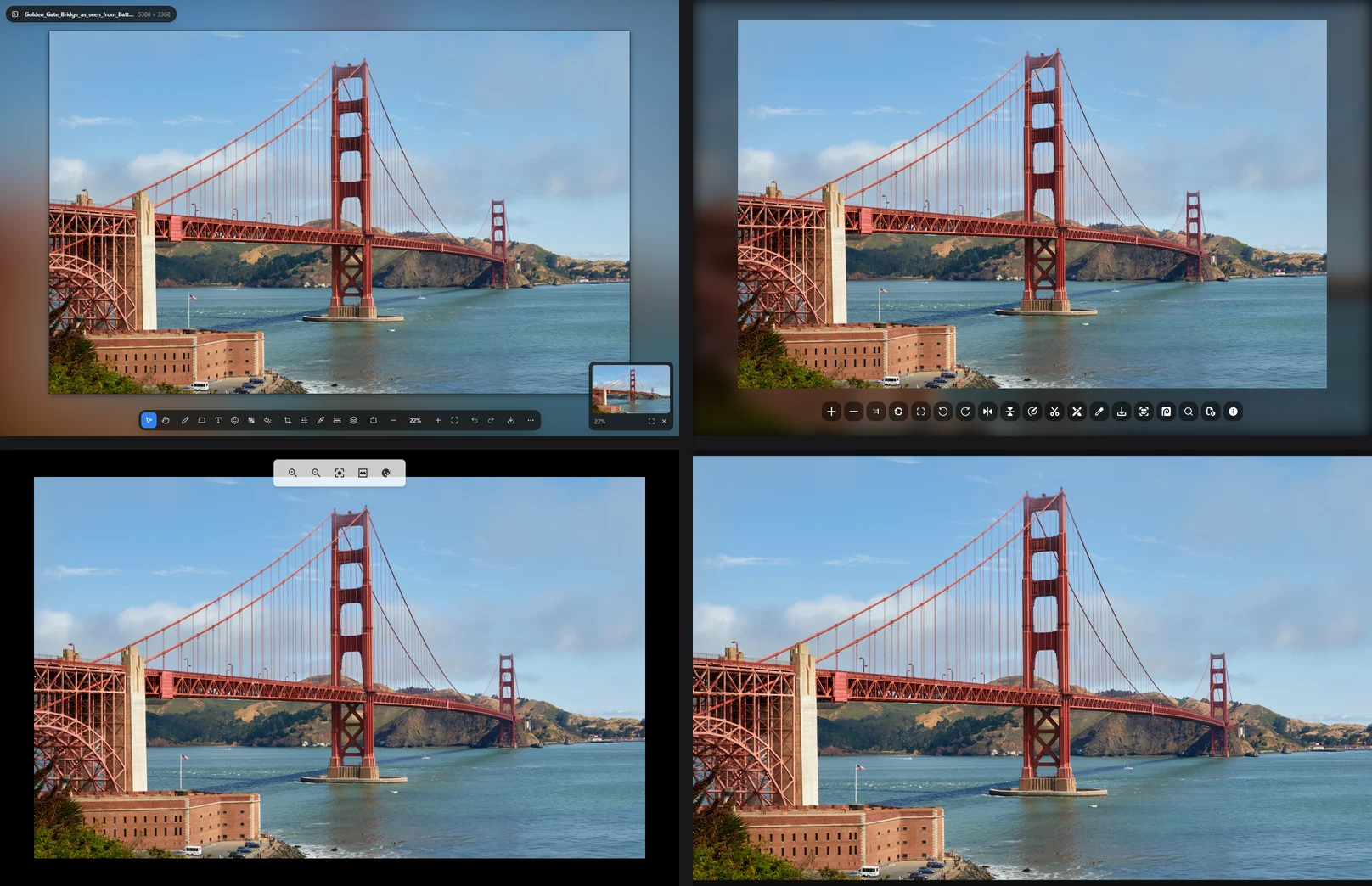
Each extension opened the same three files in their own tabs: a 5388 × 3368 photo of the Golden Gate Bridge, a map of the United States as an SVG, and a short animated GIF, all from Wikimedia Commons. The zoom tests used the mouse wheel over the cables left of the bridge’s south tower.
| Extension | Image tabs | SVG | Wheel zoom | Max zoom | Rotate, flip | Pixels | Editor |
|---|---|---|---|---|---|---|---|
| BetterViewer | yes | no | to cursor | 6400% | both | blocks | yes |
| OpenImage Viewer | yes | yes | to cursor | 10,000% | both | smoothed | yes |
| Oolong | yes | yes | buttons only | none hit | neither | smoothed | no |
| Image Zoom | no | no | reversed | — | rotate | — | no |
| Image Manipulator | no | no | menu only | 300% | both | — | no |
| Bellevue | yes | yes | to cursor | none hit | both | P for blocks | no |
“To cursor” means the detail under the mouse stays under it while the image grows: after five notches, the same cable sat under the cursor in all three. Image Zoom’s wheel works only in its right-click overlay, and in reverse. “None hit” means the zoom was still going when the test stopped: Bellevue at 85,720% after 85 notches, and Oolong at 2028% after 20 clicks. “Blocks” means each image pixel is drawn as a sharp square at high zoom, which keeps pixel art and screenshots crisp, where “smoothed” blurs them; a dash wasn’t tested. The guide to pixelated zoom explains why blocks matter. All four image tab viewers kept the GIF animating.
Thumbnail or original: what each one opens
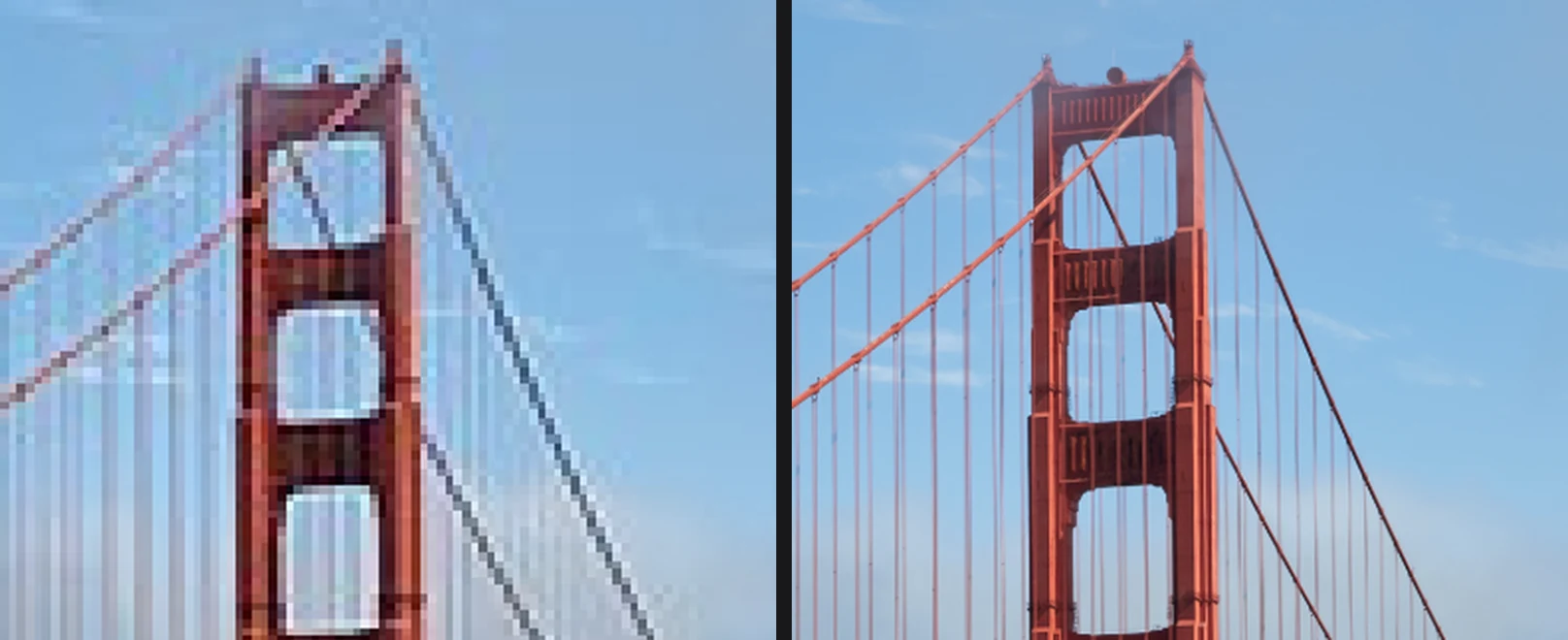
Many images on a web page are smaller copies. A viewer can only show the file it’s given, and the right-click menu gives it whatever copy the page loaded. Two thumbnails tested this:
- the photo above, as a 330-pixel thumbnail in Wikipedia’s article on the Golden Gate Bridge, whose original is 5388 pixels wide;
- Sunrise on the Tetons, the top post of the week on r/LandscapePhotography on 18 October, which the feed loads as Reddit’s 1080-pixel preview of a 2434-pixel upload. Reddit’s top posts change, so the same link shows other photos later.
| Extension | Wikipedia, 330 → 5388 | Reddit, 1080 → 2434 |
|---|---|---|
| BetterViewer | 330 | 1080 |
| OpenImage Viewer | 330 | 1080 |
| Image Zoom | 330 | 1080 |
| Image Manipulator | in place | in place |
| Bellevue | 5388 | 2434 |
The widths, in pixels, are those of the file each one showed from its right-click item. Oolong has no right-click item. Image Manipulator enlarged the page’s own image where it was. BetterViewer, OpenImage Viewer and Image Zoom open exactly the address Chrome passes them. Bellevue first runs that address through its rules for hundreds of sites, which turn a thumbnail’s address into the original’s, and opens that.
Sites with their own image viewers make the same split. Clicking a Reddit post’s photo opens Reddit’s lightbox, which already loads the 2434-pixel file but doesn’t zoom it with the wheel. X’s photo viewer loads a copy capped at 4096 pixels, and the photo in NASA Armstrong’s X-59 post on X is 6622 pixels wide. None of the extensions changed either viewer except Bellevue, which showed each original in its own viewer and zoomed it with the wheel. The guides to Reddit and X images show how to reach those originals by hand.
BetterViewer
BetterViewer is the most complete of the six. It’s open source under the MIT license and listed for Chrome, Edge and Firefox. Image tabs open in its own viewer, with a navigator in the corner, the file’s name and size on screen, smooth zoom toward the cursor up to 6400%, and keys for rotating (R) and flipping (Shift+H, Shift+V). At high zoom it draws sharp pixel blocks without being asked. On a GIF it adds pause, frame stepping and playback speed.
Its toolbar is also a photo editor: crop, adjustments, drawing and shapes, text, blur, a colour picker, measuring and layers. Its README lists more besides, including text extraction, a QR code scanner, reverse image search and a gallery of every image on the page. It left the SVG file to Chrome. From the right-click menu it opens the image in an overlay over the page, and it opens the copy the page loaded, labelled with its size.
OpenImage Viewer
OpenImage Viewer is open source under the MIT license and also listed for Firefox. It moves image tabs, SVG files included, to a page of its own with a row of buttons: zoom, actual size, fit, rotate both ways, flip both ways, then the tools. The wheel zooms toward the cursor, up to 10,000%, with smoothed pixels.
Like BetterViewer, it’s an editor as well: its README lists cropping, a photo editor, annotation, a colour picker, image details (EXIF), a QR scanner, reverse image search and sending the image to Photopea. Its right-click item opens the copy the page loaded, in a new tab. On install it opens a welcome tab.
Oolong Image Viewer
Oolong Image Viewer is the lightest of the tab viewers. It fits the photo with a margin, fits and centres SVG files, and adds five buttons: zoom in, zoom out, original size, fit to screen and a background switch. The mouse wheel doesn’t zoom, and nothing rotates; each click on zoom in enlarges the image by a quarter, and the image can be dragged. It has no right-click item.
Image Zoom
Image Zoom adds an Image Zoom item to the image menu, which opens the image in an overlay with buttons to zoom, rotate left and right, and close. The wheel works in reverse: scrolling up zoomed out, and scrolling down zoomed in, around the middle of the image rather than the cursor. It doesn’t flip, and it leaves image tabs alone. Its source is on GitHub without a license file.
Image Manipulator
Image Manipulator isn’t a viewer: its right-click menu changes the image where it is on the page. It scales it from 25% to 300% in quarter steps, rotates it in 45° steps, flips it, and shows the image’s details. That’s useful for a sideways photo in an article, with no window to close afterwards. The image doesn’t pan, and image tabs stay Chrome’s. It’s open source on GitHub under the MIT license.
Bellevue
Bellevue takes over image tabs, SVG files included, with no controls on screen. A photo opens filling the window by default; a setting changes that to actual size, or to filling the window only when the image is larger. The wheel zooms toward the cursor with no limit reached, dragging pans, Q and E rotate, H and V flip, and P switches to sharp pixel blocks. Rotation, flips and the pixel setting are remembered for each image. View image in current tab in the right-click menu, or a tap of Ctrl over an image, opens it in the same viewer over the page, as the original on hundreds of sites. On Reddit, X, Pixiv and Fandom the viewer also replaces the site’s own. Holding Alt over a thumbnail shows its original in a hover popup.
It has no editor: no crop, drawing, colour picker, text extraction, image details or page gallery. It’s listed for Chrome, Edge and Firefox, and it isn’t open source. On install it opens a consent page and does nothing until that is answered; the privacy policy says what it covers.
Which one to pick
- Edit or annotate the image you’re viewing: BetterViewer, which does the most, or OpenImage Viewer.
- Open source and listed for Firefox too: BetterViewer or OpenImage Viewer.
- The plainest viewer for image tabs and SVG files: Oolong Image Viewer.
- A quick overlay from the right-click menu, nothing more: Image Zoom.
- Turn a sideways image the right way up, on the page: Image Manipulator.
- The original rather than the thumbnail, a viewer inside Reddit and X, and hover zoom in one extension: Bellevue.
- A popup over thumbnails as you hover: see the hover-zoom comparison.
Open the original, not the thumbnail. Install Bellevue →