To open an X (Twitter) image at its original size, open the image in its own tab and change name= in its address to name=orig. Signed out, X serves photos as WebP, which has no orig copy, so change format=webp to format=jpg too. If the original answers 404, the photo is stored as PNG: use format=png. name=large looks like the biggest option, but in the measurements below it stopped at 2048 pixels wide, and X’s own photo viewer stopped at 4096, so for anything larger only orig gives the image as it was posted.
Signed in, clicking a photo in a post opens X’s photo viewer. The image is fitted to the window, there’s no zoom, and the copy shown can be smaller than the upload. Signed out, the same click asks you to log in. This guide shows how X names its image sizes, how to open any posted image at its original size by hand, signed in or out, and what the Bellevue extension changes.
Zoom into X images at original size. Install Bellevue →
How X image addresses work
Images attached to posts are served from pbs.twimg.com/media/, and the size is chosen by a query parameter:
https://pbs.twimg.com/media/<id>?format=jpg&name=small
https://pbs.twimg.com/media/<id>?format=jpg&name=large
https://pbs.twimg.com/media/<id>?format=jpg&name=orig
name picks the rendition. Each part of X’s interface asks for whichever rendition suits the space the image is shown in, and orig returns the image at the size it was uploaded. Older links put the size at the end of the path instead, as in .jpg:large, and the same rule applies: :orig is the original.
format picks the file type, and orig only exists in the type the image is stored in. Every other size can be had as jpg, png or webp. Most photos are stored as JPEG, but the format in the page’s address doesn’t tell you which: X serves a format=jpg copy of a PNG upload just the same. Of 87 photos checked on 16 September 2026, 10 (about 1 in 9) were stored as PNG, signed in as well as out, and for each of them format=jpg&name=orig answered 404 Not Found while format=png&name=orig loaded. Signed out, X requests photos as format=webp, and format=webp&name=orig answered 404 for every photo checked. Pixiv has the same rule for its originals, whose extension has to match the upload; the guide to Pixiv originals covers it.
What each size actually returns
On 15 September 2026, every name value was requested with format=jpg for four photos posted by NASA accounts, and the files measured:
name |
Photo 1 | Photo 2 | Photo 3 | Photo 4 |
|---|---|---|---|---|
thumb |
150×150 | 150×150 | 150×150 | 150×150 |
small |
680×466 | 680×453 | 680×453 | 679×453 |
medium |
1200×822 | 1200×799 | 1200×799 | 1200×800 |
large |
2047×1402 | 2048×1363 | 2000×1332 | 2047×1365 |
4096x4096 |
2047×1402 | 4096×2726 | 2000×1332 | 4096×2731 |
orig |
2047×1402 | 4096×2726 | 2000×1332 | 6622×4415 |
Sample: photo 1, photo 2, photo 3, photo 4.
thumbis a square crop, and for these landscape photossmallandmediumcame back about 680 and 1200 pixels wide.largecaps at 2048 pixels. For photos 1 and 3, uploaded at 2048 pixels or less, it’s already the original. For photos 2 and 4 it isn’t.4096x4096caps at 4096 pixels. It matchedorigfor the first three, but photo 4 was uploaded at 6622 pixels wide, and onlyorigreturned that.- With
format=webp, every size butorigreturned the same dimensions (photo 4’ssmallis 680 wide as webp, 679 as jpg), andoriganswered 404 for all four. - Signed in, X’s photo viewer loaded
name=largefor photo 1 andname=4096x4096for photo 4, so even the viewer showed 4096 of photo 4’s 6622 pixels.
So orig is the only value that always gives you the upload, and you can’t tell from the timeline which photos are bigger than the other renditions. Photo 4 shows what that costs. It’s NASA’s photo of the X-59 in flight, and these are the same part of it at the same scale:

name=large, enlarged to match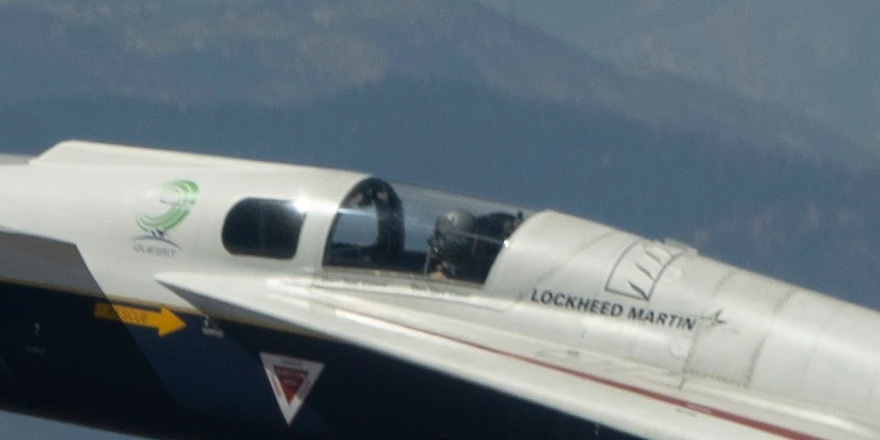
name=orig. Photo: NASA, from @NASAArmstrongOpening the original by hand
Signed in
- Right-click the image, in the timeline or in the viewer, and choose Open image in new tab.
- In the address bar, change the value after
name=toorig. For an older link ending in:small,:mediumor:large, change that ending to:orig. - Press Enter. The tab title shows the size, such as
HR4w-8PbMAAhg0k (4096×2726). If it answers 404, the photo is stored as PNG: changeformat=topng.
Right-click and Save image as saves whichever size the page loaded, so open the orig address first and save from there.
Signed out
Signed out, a transparent View media link covers each photo, so right-clicking it offers only link options, with no Open image in new tab. The address is still in the page:
- Right-click the photo and choose Inspect. Developer tools select the View media link.
- Expand the
<div>just above it to reach the<img>. Itswidthandheightattributes give the original’s size, and itssrcis the address, ending informat=webp&name=smallorname=medium. - Copy the
srcvalue into a new tab, changeformat=webptoformat=jpgand thenamevalue toorig, and press Enter. If it answers 404, the photo is stored as PNG: changeformat=topng.
Checked signed out on 15 September 2026: photo 2’s <img> reads width="4096" height="2726", and its format=jpg&name=orig address opens as HR4w-8PbMAAhg0k (4096×2726). The image servers answer the same way signed in or out.
Profile pictures and banners
Profile pictures and banners are served from different paths and don’t use name. The original is the address with its size removed:
https://pbs.twimg.com/profile_images/<id>/<name>_400x400.jpg   a size
https://pbs.twimg.com/profile_images/<id>/<name>.jpg           the upload
https://pbs.twimg.com/profile_banners/<id>/<time>/600x200      a size
https://pbs.twimg.com/profile_banners/<id>/<time>              the upload
Profile pictures end in _normal, _bigger, _200x200 or _400x400 and similar; delete that suffix and keep the extension. Banners end in a size such as /600x200 or /1500x500; delete that last part. Checked on 15 September 2026 on four profile pictures, NASA’s and three from the X-59 post’s page: three uploads were 400×400, the same as _400x400, and the fourth was 320×239, which _400x400 turns into a 400×400 square. NASA’s banner is 1500×500 with its size removed.
Most sites put the size in the address the same way, and a few, like Instagram, sign it so it can’t be edited. The guide to other sites’ profile pictures covers the edit for each.
Bellevue on X
With Bellevue installed, it works out these addresses for you, including which file type the photo is stored in.
Zoom and pan in X’s viewer
Signed in, when you open a photo in X’s photo viewer, Bellevue replaces it with the name=orig copy, or the name=4096x4096 copy when no original answers, and adds the same smooth zoom and pan controls it gives standalone images:
- Scroll the mouse wheel to zoom in and out. The zoom centers on your cursor, so you can zoom straight into a detail.
- Click and drag to pan around the zoomed image.
- Rotate with Q and E, flip with H and V.
Clicking the dark area around the image closes the viewer, as it does without the extension.
Every photo the viewer opens is replaced this way, whether or not it was posted with a description, and the 4096-pixel ceiling X’s own viewer stops at doesn’t apply: checked on 16 September 2026, photo 4 opened at 6622×4415 and photo 2 at 4096×2726, each from its format=jpg&name=orig address.
Profile pictures and banners get the viewer too, signed in or out, showing the upload with its size removed: NASA’s profile picture opened at 400×400 and its banner at 1500×500. So do photos in chat, which X already shows at the largest size it has.
Hover over a photo
Hold Alt over any photo to see the orig copy in a hover-zoom popup, or tap Ctrl to open it in Bellevue’s viewer, signed in or out. The guide to full-size images on hover covers both. Checked with the Ctrl tap on 16 September 2026: a 680-pixel timeline thumbnail of photo 4 opened at 6622×4415 and one of photo 2 at 4096×2726.
Here and in X’s viewer, the address in the page doesn’t say which type the photo is stored in, and signed out it’s format=webp, which has no original. So for every photo Bellevue asks for format=jpg and format=png with name=orig and shows whichever answers, or the name=4096x4096 copy if neither does.
Image tabs
Open a profile picture or banner in its own tab and the address is sent to the upload before it loads: checked on 16 September 2026, NASA’s _200x200 profile picture address opened at 400×400 and its /600x200 banner address at 1500×500.
A post photo’s address is left alone. Its size is a query parameter and the file type X stored it in isn’t in the address at all, so the tab shows whichever size you opened. Edit name= by hand as above, or tap Ctrl over the photo on the page instead.
Summary
- X serves post images from
pbs.twimg.com/media/, with the size in thenameparameter and the file type informat. - Set
name=orig(or end older links with:orig) to open the original, and if that answers 404, setformat=png. Signed out, find the address with Inspect and changeformat=webptoformat=jpgfirst. - For profile pictures and banners, delete the size from the end of the address.
- Bellevue shows a photo’s original in a popup while you hold Alt over it, or opens it when you tap Ctrl, signed in or out. It adds zoom, pan and rotation in X’s viewer to every photo it opens, as well as to profile pictures, banners and chat photos. Profile picture and banner tabs are sent to the upload too. Zoom and pan inside X’s viewer can be turned off under Sites in Bellevue’s settings; the Alt popup, the Ctrl tap and the tab redirects stay on.
Zoom into X images at original size. Install Bellevue →