To open a Pixiv image at its original size, sign in to Pixiv and click the illustration on its artwork page, or right-click it and choose Open link in new tab. Signed out, the illustration isn’t a link, and clicking it asks you to create an account. Pasting an i.pximg.net address into the address bar gives 403 Forbidden, signed in or not, because Pixiv’s image server only answers requests that come from pixiv.net.
On a Pixiv artwork page, the illustration you see is a resized copy. Signed in, clicking it shows the original in the page at its actual size, with no zoom controls, so you scroll to see the rest. Copy an image’s address into a new tab instead and you get 403 Forbidden. This guide explains the 403, how Pixiv’s image addresses work, how to open originals yourself, and what the Bellevue extension changes on pixiv.net.
View Pixiv originals with smooth zoom and pan. Install Bellevue →
Why a Pixiv image shows 403 Forbidden
Pixiv serves every image from i.pximg.net, and that server checks where the request came from. A request with Pixiv as its referrer, the way pages on pixiv.net load images, gets the image. A request with no referrer, which is what happens when you paste the address into a new tab, gets 403 Forbidden. This applies to the resized copies and to the originals alike, and signing in doesn’t change it.
So the image isn’t gone or private. It just has to be opened from Pixiv.
Checked on 15 September 2026 with four illustrations, three of them from Pixiv’s own official account. Every image address requested with no referrer answered 403 Forbidden, resized copies and originals alike. With https://www.pixiv.net/ as the referrer, every one of them loaded. In Chromium, the original of the artwork in the example below, typed into the address bar, showed 403 Forbidden both signed in and signed out.
How Pixiv image addresses work
An artwork page shows a resized copy from the img-master folder. The original lives in img-original, under the same date path:
https://i.pximg.net/img-master/img/2022/07/26/02/35/50/100000000_p0_master1200.jpg
https://i.pximg.net/img-original/img/2022/07/26/02/35/50/100000000_p0.jpgimg-masterbecomesimg-original.- The
_master1200suffix is dropped. _p0is the page number. A work with several images uses_p1,_p2and so on.- The resized copy is always a
.jpg, but the original keeps the format it was uploaded in. Pixiv accepts JPG, GIF and PNG uploads, so an original can end in.pnginstead. Opened from Pixiv with the wrong extension, the address answers 404 Not Found. X originals work the same way, loading only in the format the photo is stored in, as the guide to original-size X images shows.
The resized copy is capped at 1200 pixels on its longer side, so how much you gain depends on the upload. From the same check:
| Illustration | img-master (artwork page) |
img-original |
|---|---|---|
| Pixiv official, short story contest theme illustration (2010) | 1200×1200 | 2756×2756 |
| Pixiv official, short story contest theme illustration (2010) | 1170×1200 | 2277×2337 |
| Pixiv official, P-1 Grand Prix 2010 artwork | 1200×1135 | 1447×1368 |
| Artwork 100000000 (2022), the address example above | 1200×886 | 1767×1304 |
Sample: artworks 13387470, 13387538, 12216978 and 100000000. Each size was read from the file itself.
For the first, the original has more than five times the pixels of the copy the artwork page shows.
Thumbnails in listings add a crop folder at the start, such as /c/250x250_80_a2/, and point to a cropped version, either a square or a crop the artist chose, which sits in custom-thumb instead of img-master. So start from the image on the artwork page rather than from a thumbnail.
Opening the original by hand
Signed in
On the artwork page, the illustration is a link, and that link points to the original in img-original. Because it’s opened from pixiv.net, the referrer check passes.
- In the page: click the illustration. Pixiv shows the original over the page at its actual size, and you scroll to see the rest of it.
- In its own tab: right-click the illustration and choose Open link in new tab, or middle-click it. The original opens on its own, where you can view it and save it.
In a work with several images, click Show all first. Each image links to its own original, _p0, _p1 and so on. Checked on 15 September 2026: artwork 100000000 opened in a new tab as 100000000_p0.jpg (1767×1304), and on a 12-image work from Pixiv’s official account each page linked its own .png original.
Choosing Copy link address and pasting it yourself gives you the right address, but opening it from the address bar sends no referrer, so it stops at 403 again.
Signed out
Signed out, the artwork page shows the same resized copy, but the illustration isn’t a link and the page doesn’t contain the original’s address. Clicking the illustration opens a prompt instead:
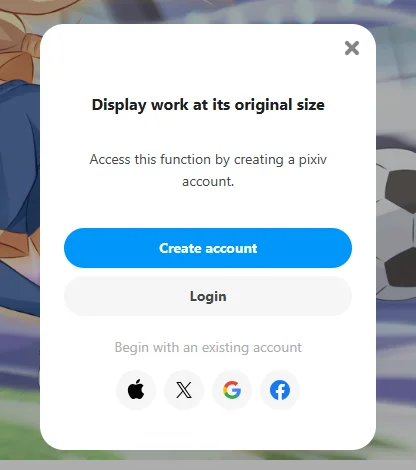
Checked on 15 September 2026 in a new Chromium profile, on artwork 100000000. Without an account, Pixiv’s pages offer no way to open the original.
Pixiv with Bellevue
With Bellevue installed, clicking an illustration on an artwork page opens its original in Bellevue’s viewer over the page, signed in or signed out. Hover zoom shows the original of a thumbnail, and a pasted image address loads instead of showing 403.
Zoom and pan
Signed in, the viewer loads the original the illustration links to. Signed out, where there is no link, Bellevue looks the original up from Pixiv. Either way you get the same smooth zoom and pan controls that work on standalone images, instead of Pixiv’s scroll-only view:
- Scroll the mouse wheel to zoom in and out, centered on your cursor.
- Click and drag to pan around.
- Rotate with Q and E, and press Esc to close the viewer.
- Press P to show pixel art as crisp pixels instead of a blur. Bellevue remembers it, along with rotation, the next time the illustration opens.
The same applies to each page of a work with several images. Checked signed in on 15 September 2026: artwork 100000000 opened in the viewer at 1767×1304, and the second page of the 12-image work at its 1080×1080 original.
Hover zoom on thumbnails
By default, holding Alt over a thumbnail on pixiv.net shows the original in a hover zoom popup, signed in or signed out, even for the cropped thumbnails in listings. Checked signed in on 15 September 2026: a 250×250 thumbnail on Pixiv’s official account showed its 1200×1698 .png original. The guide to hover zoom covers the popup’s settings and the Ctrl tap that opens the original full-screen.
Image addresses in their own tab
When a tab opens an i.pximg.net address, Bellevue sends Pixiv as the referrer, so a pasted original loads instead of showing 403. Checked signed in on 15 September 2026: the original of artwork 100000000, typed into the address bar, opened as 100000000_p0.jpg (1767×1304). Pixiv images embedded on other sites are still blocked, since Bellevue only adds the referrer for tabs.
Summary
i.pximg.netanswers 403 to any request that doesn’t come from Pixiv, signed in or not, so pasted image addresses don’t open.- Originals live in
img-original, without the_master1200suffix, and can be.pngas well as.jpg. - Signed in, click the illustration on the artwork page, or open its link in a new tab, to get the original without an error. Signed out, Pixiv doesn’t link the original.
- Bellevue opens originals in a zoomable viewer when you click an illustration, signed in or signed out, shows them on hover, and loads pasted image addresses. The viewer on artwork pages can be turned off under Sites in Bellevue’s settings.
View Pixiv originals with smooth zoom and pan. Install Bellevue →